🎓The Praxis Coach
Chat and Live voice coaching, what the Coach can do, quotas, and giving feedback on its answers.
What the Praxis Coach is
The Praxis Coach is an AI saxophone teacher built into the app. It is not a scripted lesson tree — it reads what you actually played. Praxis listens through its real-time pitch detection, so the Coach can talk about your intonation, timing, and articulation on the notes you just played, and it can look back at your Repertoire and your recent practice sessions.
The Coach comes in two forms, and you switch between them freely:
- Chat — a text conversation you type into.
- Live — a hands-free voice coach that listens while you play.
Chat coaching
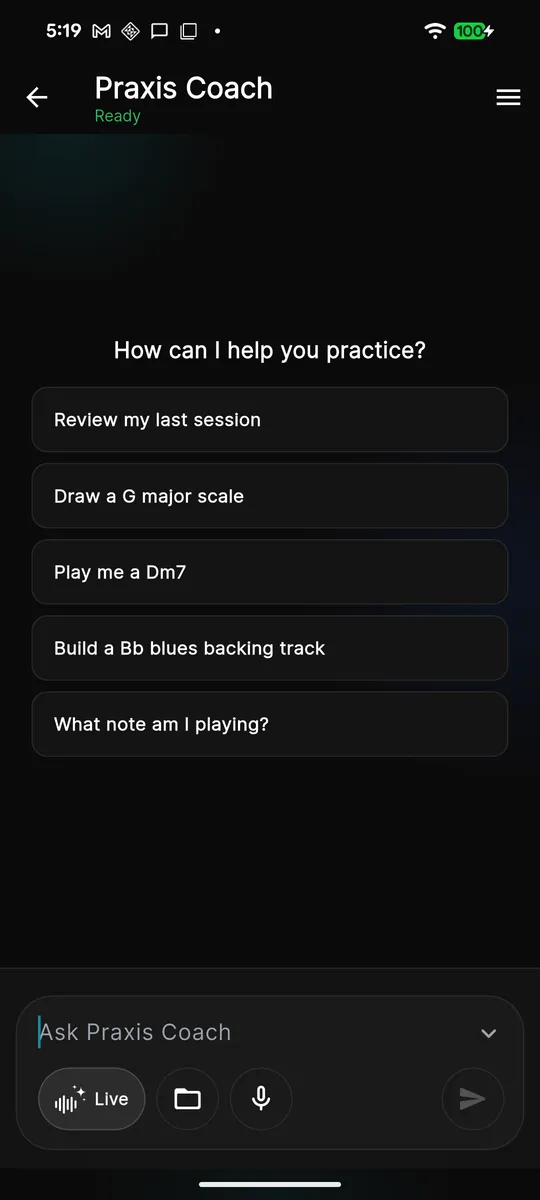
Open Studio, tap the Praxis Coach card at the top, and type into the Ask Praxis Coach box at the
bottom. Ask a full question — the Coach answers in the chat and can pull in
your own data when it helps.
Good questions to ask
- "What should I work on next based on my last few sessions?"
- "My tuning drifts flat on long tones — how do I fix it?"
- "Give me a scale exercise for the piece in my Repertoire."
- "How do I finger altissimo G, and what's a drill to build up to it?"
Live voice coaching
Tap Live to open the voice Coach. Live is a push-to-ask ("walkie-talkie") surface: the mic stays open so you can play, and when you want to speak, you hold the mic button, ask your question, and release to send. The Coach replies out loud. It is half-duplex — while the Coach is speaking it stops listening, and holding the mic again interrupts it.
Two things you can do on the Live screen:
- Ask any time — hold the mic, ask, release.
- Play for feedback — pick a duration (10s / 30s / 60s), play your take, and the Coach gives feedback on what it heard.
Use Live when your hands are on the horn and you don't want to type — running a drill, trading ideas mid-practice, or getting quick feedback on a phrase you just played.
What the Coach can and can't do
The Coach draws on your daily plan's three pillars — Sound, Fluency, and Repertoire — plus what you're doing in the separate Play tab. It can:
- Discuss your real playing — pitch, timing, and articulation it detected.
- Reference your Repertoire, practice plan, and recent sessions.
- Explain saxophone theory, fingerings, scales, and exercises.
- Suggest what to work on next and how to practice it.
It can't:
- Hear anything from before you opened the app — it works from your captured practice data, not a recording of your whole life.
- Guarantee perfect transcription from audio — precise note capture is a MIDI feature (see MIDI & Devices).
- Replace a human teacher for hands-on posture and embouchure correction.
Quotas and fair-use limits
The Coach runs on a fair-use budget. The Live voice Coach is the most resource-intensive surface, so it carries the tightest limits. If you reach a limit, the Coach tells you and you can come back later or switch to text Chat, which is more generous. Higher subscription tiers get more generous Coach and voice allowances.
Giving feedback (thumbs up / down)
Every Coach answer has a thumbs up and thumbs down control. Tap thumbs up when a reply was useful; tap thumbs down when it missed, and you can add a quick reason — Wrong info, Too long, Off topic, or Tool issue.
This is not a formality. Your ratings are how we find where the Coach is weak and make it better for everyone — a few taps genuinely shape future answers. You can change your mind and re-rate a reply at any time.