📅Your Daily Practice
The Home screen, Daily Brief, Workout-of-the-Day pillars, streaks, and weekly goals.
The Home screen at a glance
Home is the first tab in Praxis. It answers one question: what should I play today? Everything on it is built fresh each morning from your recent practice, so you never have to plan a session yourself.
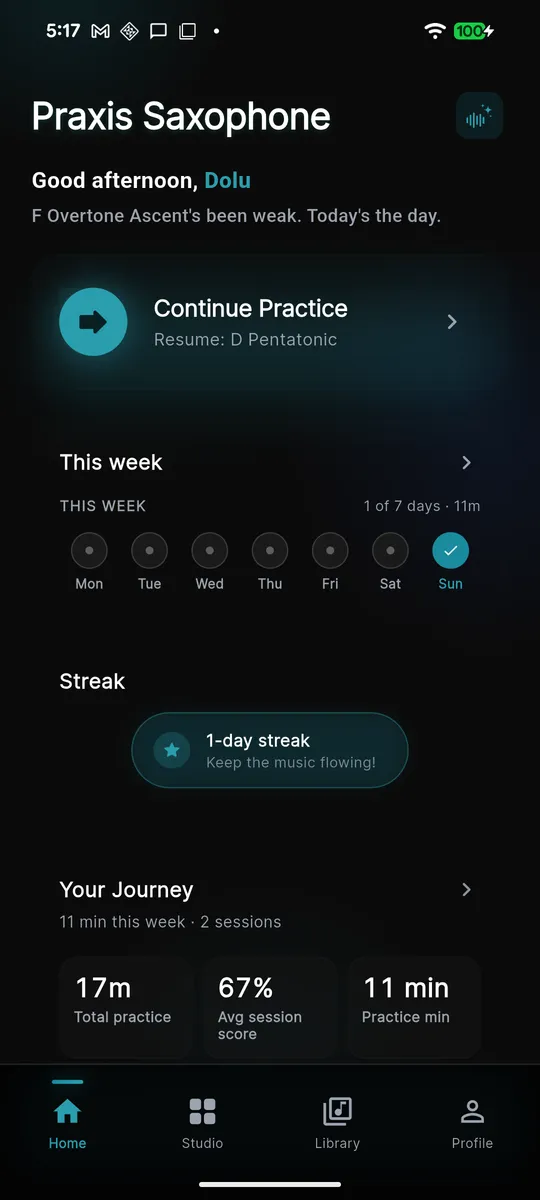
From top to bottom, Home shows:
- A personal greeting — "Good morning, [your name]" plus a short hook, like "Day 4 of your streak. Let's go." or "Welcome back — it's been 3 days."
- The Daily Brief — a couple of one-line notes on what to focus on today.
- The practice hero — one big button that starts or resumes today's session.
- Your Workout-of-the-Day — three pillar cards making up today's plan.
- Streak and This week summary cards near the bottom.
Start or resume today's session
The hero button changes label based on where you are in the day:
- Start Practice — shown before you've played today. It lists the estimated minutes and how many pillars are in the plan.
- Continue Practice — once you've finished at least one pillar, the button
reads
Resume: [next pillar]and jumps you straight to the next station. Nothing is lost if you close the app mid-session. - Tackle [skill] today — if the Coach spots a weak area that's overdue for review, the hero points you there first.
What to practice today: the Daily Brief
The Daily Brief is a short, plain-language summary sitting above your plan. It might highlight a skill that's been slipping, celebrate something you nailed yesterday, or point you at a piece to revisit. You can tune which topics appear from your brief preferences, so the Brief stays relevant to what you care about.
Workout-of-the-Day and its pillars
Your Workout-of-the-Day (WOD) is built from three pillars — a pillar is one skill area, and each day you get one focused exercise per pillar:
- Sound — long tones, air, and pitch stability.
- Fluency — scales, articulation, and finger drills.
- Repertoire — a song from your imported material to work through, section by section.
Looking for a looser, gamified challenge? The separate Play tab has Echo Back, Scale Roulette and All-Keys Drill, outside the daily rotation.
Praxis picks each day's exercise for you, weighted by your skill level, what you've practiced recently, and which skills are due for review — so the plan shifts as you improve instead of repeating the same drills. Tap any pillar card to open its exercise; finishing it marks that pillar complete and advances the hero to the next one.
Streaks and milestones
Your streak is the number of days in a row you've practiced. Complete any pillar and today counts. The Streak card near the bottom of Home shows a ribbon with your current run; miss a day and it resets to "Start a new streak."
Two milestones unlock along the way:
- 7-day streak — one full week of daily practice.
- 30-day streak — a full month.
Streak reminders
Praxis can send a local reminder the day after you practice so you don't break the chain. It schedules itself near your usual practice time, or at a time you pick. The message adapts to your streak length — a fresh nudge to start, or "Keep your 12-day streak alive."
Weekly goals
During onboarding you set a weekly goal in minutes — a dial with quick presets (Casual ~10 min, Serious ~30 min, and up to 60+ min per week). This target drives the This week card, which shows a dot for each day you practiced and your minutes so far this week.
Adjusting your goal later
You're not locked in. To change it, open Settings and edit your weekly goal — the new target takes effect immediately and the This week card updates against it. You can also flip the practice reminder on or off from the same screen.