No saxophone? Play one here.
Get a feel for it right here — then download Praxis to play, hum, and learn on the real thing.
Praxis Saxophone
Play freely. Learn instantly. Watch your skills grow.
Tuner
Alto Saxophone (440Hz)
Listening…
Play a steady note
Hold one note for 2-3 seconds with the bell aimed toward the mic.
Praxis Coach
Ready
what's the d# note
The written D#4 (which is concert F#3) is played by pressing down your left hand's first and second keys, and the right hand's first key, along with the side D# key with your right pinky.
Fingering
D#4
Ask Praxis Coach
Connect your
MIDI device
Tap a device below to connect via Bluetooth.
Available Devices
No devices found
Scan Again
Saturday, Jun 20
Today's Practice
20 min
Total time
Bb Scale Sustains
MF · Ascending Descending
Develop stable tone through sustained generated drills.
Generated tone
D Pentatonic
Smooth and steady
Weakness Drill (SM2)
2 Review Cards Due Today
Mastery: 82% · SM2 schedule flagged this for tone stability.
Mastery: 74% · Needs swing feel review.
Your Journey
22.0% rolling pitch accuracy
16h
Total practice
22.0
Avg session score
1
Day streak
30-day pitch stability
53 sessions
81%
Avg pitch
22
Practice min
Skill progression
54
Lessons
22.0
Avg score
16h
Practice
Starting Templates
Tap a template starting point to drop it directly into Coach.
Bb Blues Shuffle
92 BPM · Shuffle
Slow Funk Groove
80 BPM · Straight
Jazz Swing
140 BPM · Swing
Gospel Groove
100 BPM · Straight
Latin Groove
110 BPM · Latin
Pop Ballad
70 BPM · Ballad
Profile
Dolu
Intermediate · 1-day streak
Toward Advanced · 22% pitch
This week
1 of 7 days · 2m
Pillars this week
Your library
← Tuner (Studio)
Listens
On-device pitch detector tracks every note you play. No cloud upload. Your audio stays on your phone.
MIDI Wind Controllers
Direct compatibility with Emeo, Akai EWI, Yamaha YDS, and other MIDI controllers. Praxis treats MIDI input the same as your mic — with perfect precision.
Praxis Coach
Your Praxis Coach (text and voice) responds to your playing in real time. Adapts to your weak spots. Remembers your history.
Today's Practice
A fresh, balanced practice plan generated daily around three core pillars: Sound, Fluency, and Repertoire.
Spaced repetition
Uses the adaptive SM2 algorithm to automatically schedule review sessions based on your pitch and rhythm accuracy.
Generates
Custom backing tracks at any tempo and key, generated instantly for the exact passage you're drilling.
Personalizes
Praxis builds a model of your playing over time. The more you practice, the smarter it gets about what to focus on next.
Tracks progress
Pitch accuracy, tempo consistency, session streak — clear metrics so you can see you're improving week over week.
Multiple Ways to Play
From acoustic mic tracking to direct digital connection.
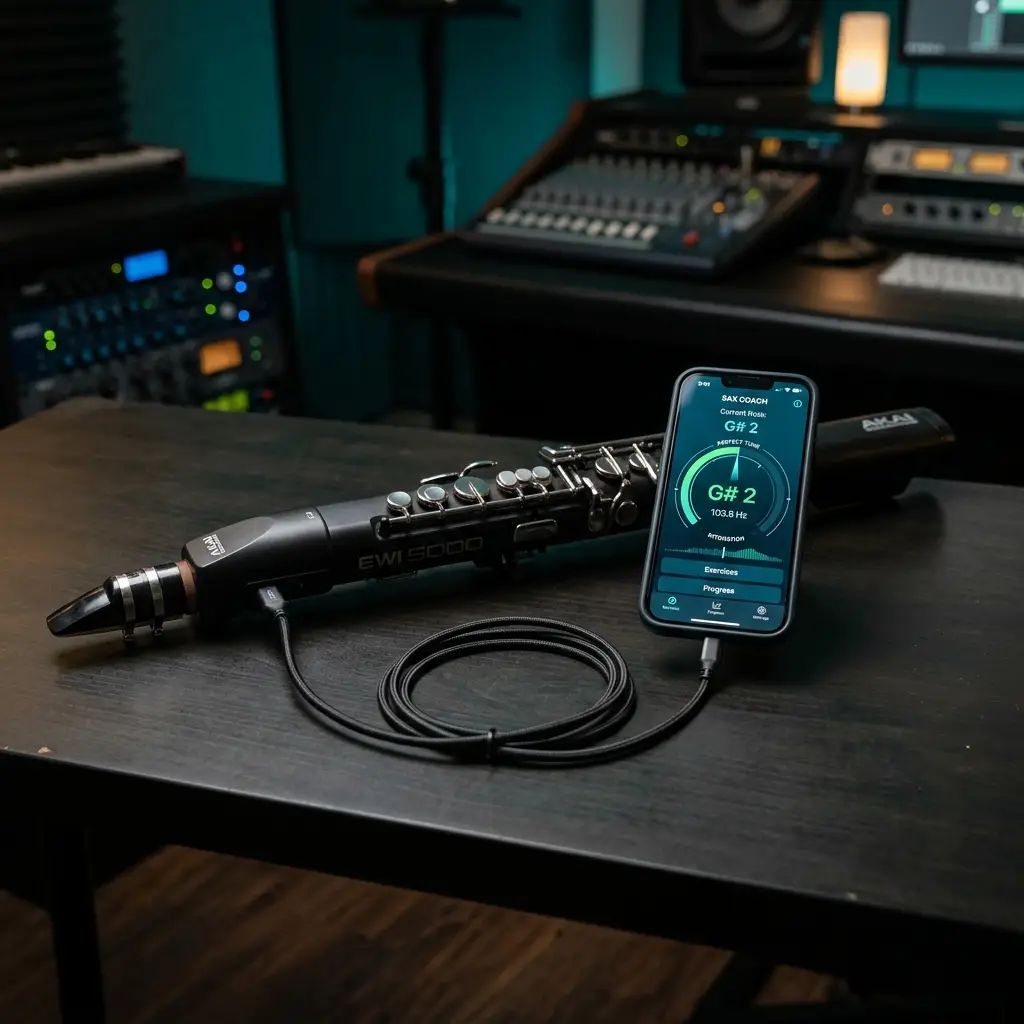
Saxophone microphone input
The primary path. On-device pitch detection at 44.1 kHz unprocessed audio. Your audio never leaves your phone.
MIDI wind controller or device
Connect your Emeo, Akai EWI, Yamaha YDS, or keyboard via USB or Bluetooth. The Coach hears every note exactly — no microphone variance, no room noise, no missed soft notes. Praxis transposes automatically to your saxophone key (alto, tenor, soprano).
Both at once
Use your sax for the practice session, plug in a MIDI device when you want to record a take or sketch a phrase. One system, different inputs.
Pricing
Free to start. Upgrade for higher limits.
Free
Try Praxis with real coaching.
- On-device pitch detection
- Praxis Coach — 150 conversations per month
- Session history — last 7 days
- MIDI device input — wind controller or keyboard
- Source separation — 1 free trial
Pro
For players who practice seriously.
- Everything in Free
- Praxis Coach — 750 conversations per month
- Source separation — 4 tracks per month
- Backing tracks — 6 generated tracks per month
- Full session history
- MIDI device input (transposes to Eb/Bb/C, USB/Bluetooth)
- Weak-spot practice recommendations
- Scale fluency tracking
Studio
For gigging musicians and power users.
- Everything in Pro
- Praxis Coach — 2,500 conversations per month
- Source separation — 15 tracks per month
- Backing tracks — 25 generated tracks per month
- Priority support
*Educator tier for larger schools and teacher tools is currently in development — contact us for early access. All prices in USD. Cancel anytime.
Pricing FAQ
Is Praxis free?
Praxis is free to start. Pro and Studio are optional paid tiers that raise the usage limits; see the plans above.
Can I cancel anytime?
Yes, absolutely. Subscriptions are billed monthly or annually through the App Store or Google Play, and you can cancel directly from your device's subscription settings at any time. Once you cancel, your premium features will stay active until the end of your current billing cycle. Note that we don't offer refunds for partial periods unless required by your app store's policies.
What's the difference between monthly and annual?
Annual plans are billed once a year: Pro is $99.99/year and Studio is $199.99/year. Annual subscribers also get a 25% rollover of unused monthly caps—so if you have a quiet practice month, some of those unused Coach conversations will carry forward to the next month.
Can I switch between Pro and Studio?
Yes, you can switch tiers whenever you like. If you upgrade, the change happens immediately and you'll just be billed the prorated difference. Downgrades take effect at the start of your next billing cycle to keep things simple. And don't worry—all your sessions and practice history will move with you.
Do you offer student or teacher discounts?
Not just yet. We have a dedicated Educator tier with student-account bundling on our roadmap. If you teach saxophone and want to be in the first cohort, feel free to request access here.
What counts as a conversation?
A conversation is any back-and-forth exchange where you ask the Praxis Coach a question or request feedback and it responds. Basic tools like continuous pitch detection and the tuner don't count toward your conversations at all.
What happens when I hit a monthly cap?
Your usage resets at the start of each calendar month. If you hit a cap mid-month, the feature pauses until reset or until you upgrade to a higher tier. Your data — including practice sessions and history — is always preserved.
Product FAQ
Everything you need to know about how Praxis works.
What saxophones does Praxis work with?
Alto, tenor, and soprano. Praxis handles all the transposition automatically. When you play a written C major on your alto sax, the app knows it sounds as a concert Eb major and labels the notes correctly in your written key so you don't have to do mental transposition. You can change your saxophone type anytime in Settings.
Do I need a MIDI wind controller or keyboard, or can I just play my saxophone?
You can play your saxophone directly into your phone's microphone—that's the primary way to use it! Praxis uses on-device pitch detection to identify what you're playing without needing to upload anything to the cloud. If you happen to have a MIDI wind controller (like Emeo, Akai EWI, or Yamaha YDS) or a keyboard, you can also connect it for perfect-accuracy testing or for building backing tracks.
How accurate is the pitch detection?
It's very accurate. Praxis uses a YIN-based pitch detector running directly on your device at 44.1 kHz raw, unprocessed audio. Under normal practice conditions, the accuracy is within ±2 cents—which is actually tighter than what the human ear can typically distinguish. Just keep in mind that room echoes, mic quality, and background noise can affect performance, so practicing in a reasonably quiet space always gives the best results.
Does Praxis work offline?
Yes, the core tools do. Pitch detection, the tuner, session recording, and your practice history all work fully offline. You only need an internet connection for the Praxis Coach (the AI conversation layer) because it runs in the cloud. We're also exploring on-device coaching using Apple Foundation Models for future versions so you can practice completely offline.
Is Praxis right for beginners?
Praxis works best for adult learners with at least a few months of saxophone experience—enough to produce a steady tone that the pitch detector can track. If you're a complete beginner, we recommend combining Praxis with traditional lessons or a beginner-focused app for the first few months. Once your tone starts to stabilize, Praxis is the perfect tool to take you further.
Does Praxis replace a music teacher?
No, and we don't want it to! Think of Praxis as your daily practice companion for the six days a week when you aren't in a lesson. A real teacher gives you personal guidance, embouchure correction, and human accountability that AI can't replicate. Praxis just makes sure the time you spend practicing on your own is as focused and productive as possible.
How does the Praxis Coach know what I played?
Praxis listens to your saxophone through your phone's microphone in real time, detecting pitch, when each note starts (onset), your articulation, and your dynamics. When you ask the Coach a question, it uses these musical observations to give you specific feedback—like noticing your high B was 8 cents flat or that you rushed slightly on the second half of a phrase.
Is my practice data private?
Absolutely. Your audio is processed directly on your device and Praxis never uploads your raw audio to our servers. The Praxis Coach receives only musical observations (like notes, intonation, dynamics, and scales), never the raw audio itself. You can export or delete all of your data at any time from Settings → Data & Privacy.
What devices does Praxis work on?
It works on iPhones running iOS 17 or later, and Android phones running Android 10 or later. While it works on tablets, the layout is currently optimized for phone-sized screens. You can also optionally connect wired or Bluetooth MIDI devices.
Can I use Praxis with backing tracks I already own?
Yes — just import it from the Repertoire section of Studio and Praxis will separate it into stems for you. Mute the lead, play with the band, and loop the hard sections. You can also generate custom AI backing tracks on the fly (available on Pro and Studio tiers) using Lyria.
Does Praxis work for jazz, classical, both?
Both! Praxis tracks pitch accuracy and articulation in real time, whether you're playing bebop chromatic lines, blues phrasing, or classical etudes. The engine keeps up with whatever you play, and your AI coach can give you style-specific feedback on phrasing, tone, and technique. Swing feel analysis and other genre-specific tools are on the roadmap.
What if I get stuck or have a bug?
You can reach us directly at support@clefscape.com. Studio tier members get priority support, Pro tier has standard email support, and Free tier users can access the in-app help center. Bug reports that include a screen recording always get the fastest response!