👤Account & Subscription
Tiers and the free tier, restoring and managing your subscription, exporting your data, and deleting your account.
Tiers at a glance
Praxis Saxophone has a free tier plus paid tiers that unlock more practice capacity. You do not need to pay to start playing — the free tier is a complete way to practice.
- Free — mic pitch tracking and cents-accurate tuner, calibration for your horn, the daily free workout, and a small Repertoire (one saved track).
- Pro — a larger Repertoire and more stem/processing capacity for building your own practice material.
- Studio — the largest Repertoire and processing capacity for heavy users.
- Educator — a plan for teachers and school programs, with student practice visibility, assignments, and dashboards. This tier is in development with early access on request.
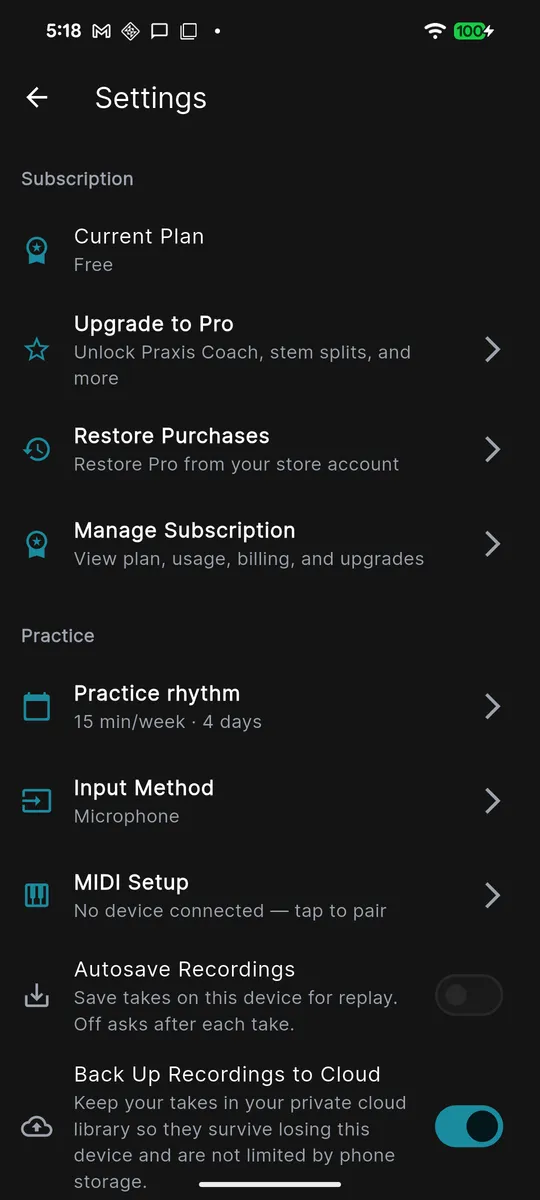
Restoring purchases
If you already subscribed and switched phones, reinstalled the app, or signed in on a new device, use Restore Purchases to bring your paid access back. No second charge is involved — it re-checks the store for the purchase already tied to your account.
- Open Settings, then tap Manage Subscription.
- Tap Restore Purchases.
- Sign in to the App Store or Google Play with the same store account you originally purchased with, if prompted.
- Wait for the confirmation. Your tier updates once the store confirms the purchase.
Managing or cancelling your subscription
Billing is handled by the app store, not by Praxis directly, so you cancel and change plans through your device's store. When you cancel, you keep paid access until the end of the period you already paid for — nothing is cut off immediately.
The fastest route is inside the app: Settings → Manage Subscription → Manage on Store, which opens the store's subscription page for you. If you prefer to go through the store directly:
iPhone / iPad (App Store)
- Open the Settings app and tap your name at the top.
- Tap Subscriptions.
- Tap Praxis Saxophone.
- Tap Cancel Subscription, or choose a different plan to change tiers.
Android (Google Play)
- Open the Google Play Store app.
- Tap your profile icon, then Payments & subscriptions → Subscriptions.
- Tap Praxis Saxophone.
- Tap Cancel subscription, or Manage to change plans.
Export My Data
You can download a copy of your Praxis data at any time. This is your data to keep, and it is handy before deleting your account.
- Open Settings and scroll to the privacy section.
- Tap Export My Data.
- The app builds a
.jsonfile (with a plain-language README) and opens the share sheet so you can save it to Files/Drive, email it, or send it to another app.
The export includes your profile, practice sessions, your Coach memory profile, and any personal licks you saved before that feature was retired.
Deleting your account
Deleting your account is permanent and cannot be undone. It removes your account, your profile, and your subscription profile data from Praxis. Consider running Export My Data first if you want to keep a copy.
- Open Settings and tap Delete Account.
- Read the warning, then type
DELETEin the confirmation box to enable the button. - Tap Delete Account to confirm.